herd isolate 8.3 pins a PHP version for a site, but only for the web server. In the terminal, in the same directory,
php is still Herd's global default:
$ cd ~/Herd/my-project
$ herd isolated | grep my-project
| my-project.test | 8.3 |
$ php -v
PHP 8.4.25 (cli) ...
So composer require can resolve packages for the wrong PHP version, and php artisan runs on a version production
does not have.
This guide sets up a shell hook that switches php (and with it composer, artisan and vendor/bin tools) to the
isolated version when you cd into the site, and back when you leave. Herd runs on macOS and Windows only; Linux
readers can skip to Linux.
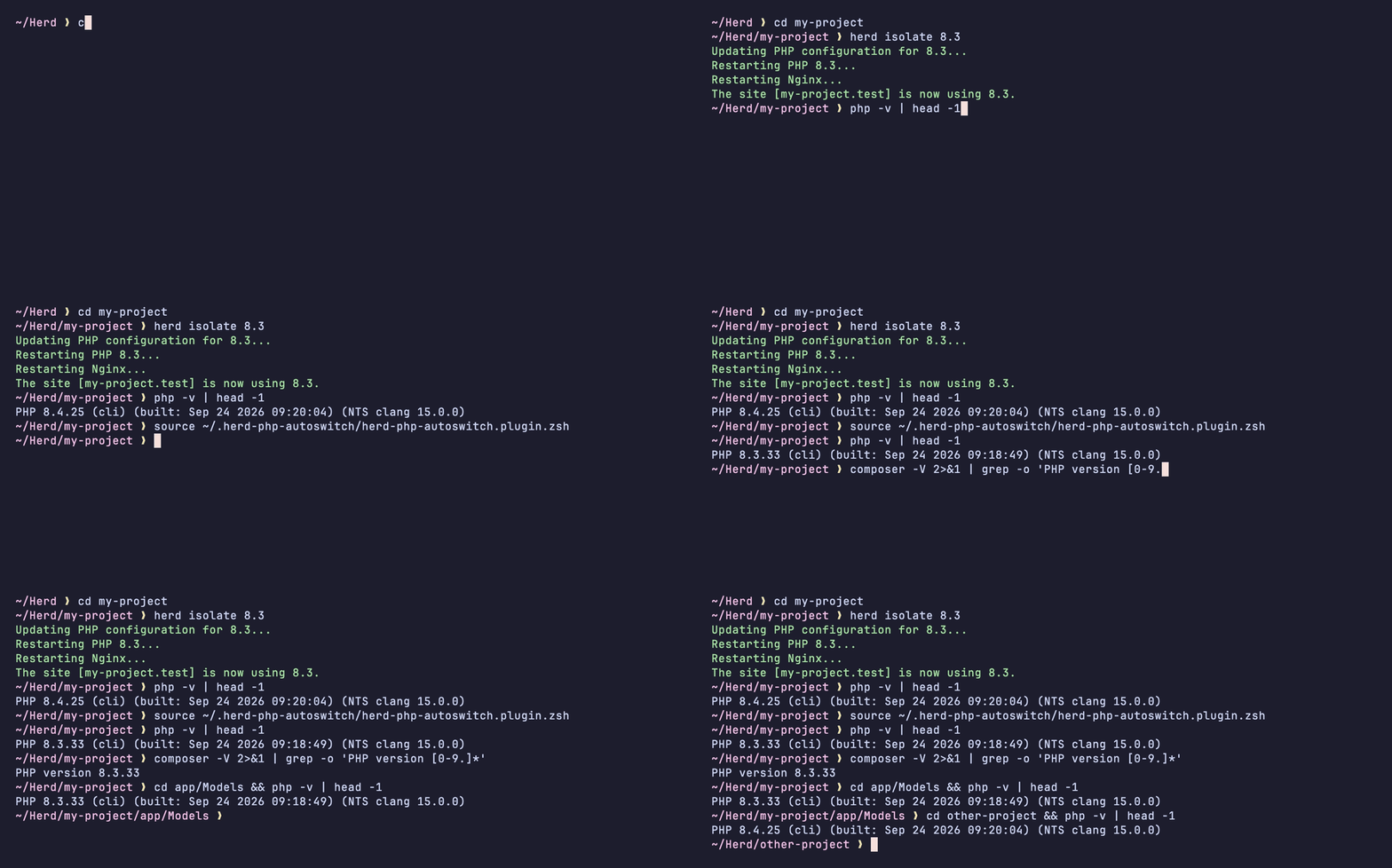
If you would rather install it than paste it into your shell config, the hooks are packaged as herd-php-autoswitch. It installs through antidote, zinit, oh-my-zsh or Fisher, and also covers Nushell and Windows PowerShell 5.1. It finds sites the way Herd does, so linked and parked sites work (see Limitations).
The rest of this guide shows how the hook works and gives a standalone version for each shell.
Before you start
-
Isolate the site, if you have not already. The PHP version must be installed in Herd (Herd → Settings → PHP):
cd ~/Herd/my-project herd isolate 8.3 -
Find out which shell you use. On macOS, run
echo $SHELL; the default is zsh. On Windows, use the PowerShell section.
The hook works by changing PATH, the ordered list of folders your shell searches for commands. The first php it
finds is the one that runs. Each time you change directory, the hook puts the isolated version's folder first, or
removes it again.
What Herd gives you out of the box
Herd ships proxy commands that already respect isolation:
herd php -v          # PHP 8.3.33
herd php artisan migrate
herd composer install
herd which-php       # path to the isolated binary
These only work from the site's root directory. Herd looks the site up by the current directory (its link or its name), so in a subdirectory they fall back to the global version:
$ cd ~/Herd/my-project/app/Models
$ herd php -r 'echo PHP_VERSION;'
8.4.25
As of Herd 1.30 there is no setting that makes plain php follow isolation. (herd isolate-node writes an .nvmrc
file, which nvm or fnm pick up in the terminal. There is no PHP equivalent.)
If you always run commands from the project root and don't mind the herd prefix, that is enough. Otherwise, set up the
hook for your shell below, or install herd-php-autoswitch.
zsh (macOS)
Create ~/.config/zsh/herd-isolate.zsh (run mkdir -p ~/.config/zsh first) with this content:
_herd_isolate_valet="$HOME/Library/Application Support/Herd/config/valet"
_herd_isolate_bin="$HOME/Library/Application Support/Herd/bin"
_herd_isolate_shims="$HOME/.cache/herd-isolate"
_herd_isolate_tld=$(sed -n 's/.*"tld": *"\([^"]*\)".*/\1/p' "$_herd_isolate_valet/config.json" 2>/dev/null)
: ${_herd_isolate_tld:=test}

_herd_isolate_apply() {
  local dir=$PWD version= first_line conf

  while [[ -n $dir && $dir != / ]]; do
    conf="$_herd_isolate_valet/Nginx/${dir:t}.$_herd_isolate_tld"
    if [[ -r $conf ]]; then
      read -r first_line < $conf
      [[ $first_line == '# ISOLATED_PHP_VERSION='* ]] && version=${first_line#*=}
      break
    fi
    dir=${dir:h}
  done

  path=(${path:#$_herd_isolate_shims/*})

  if [[ -n $version ]]; then
    local shim="$_herd_isolate_shims/${version//./}"
    if [[ ! -x $shim/php ]]; then
      mkdir -p $shim && ln -sf "$_herd_isolate_bin/php${version//./}" $shim/php
    fi
    path=($shim $path)
  fi
}

autoload -Uz add-zsh-hook
add-zsh-hook chpwd _herd_isolate_apply
_herd_isolate_apply
Open ~/.zshrc (open -e ~/.zshrc) and add this as the last line:
source ~/.config/zsh/herd-isolate.zsh
It has to come after the line Herd added, which looks like this:
export PATH="/Users/you/Library/Application Support/Herd/bin/":$PATH
If you use oh-my-zsh, do not put the file in $ZSH_CUSTOM: oh-my-zsh loads that folder before Herd's PATH line.
Reload the shell:
exec zsh
bash (macOS)
bash has no hook for directory changes, so this version runs from PROMPT_COMMAND and returns immediately when the
directory has not changed. It works with the bash 3.2 that ships with macOS and with bash 5.
Create ~/.config/bash/herd-isolate.bash (run mkdir -p ~/.config/bash first) with this content:
_herd_isolate_valet="$HOME/Library/Application Support/Herd/config/valet"
_herd_isolate_bin="$HOME/Library/Application Support/Herd/bin"
_herd_isolate_shims="$HOME/.cache/herd-isolate"
_herd_isolate_tld=$(sed -n 's/.*"tld": *"\([^"]*\)".*/\1/p' "$_herd_isolate_valet/config.json" 2>/dev/null)
: "${_herd_isolate_tld:=test}"

_herd_isolate_apply() {
  local rc=$?
  [[ $PWD == "$_herd_isolate_pwd" ]] && return $rc
  _herd_isolate_pwd=$PWD
  local dir=$PWD version= first_line conf p new= IFS=:
  while [[ -n $dir ]]; do
    conf="$_herd_isolate_valet/Nginx/${dir##*/}.$_herd_isolate_tld"
    if [[ -r $conf ]]; then
      read -r first_line < "$conf"
      [[ $first_line == '# ISOLATED_PHP_VERSION='* ]] && version=${first_line#*=}
      break
    fi
    dir=${dir%/*}
  done
  for p in $PATH; do
    [[ $p == "$_herd_isolate_shims"/* ]] || new=${new:+$new:}$p
  done
  PATH=$new
  if [[ -n $version ]]; then
    local shim="$_herd_isolate_shims/${version//./}"
    [[ -x $shim/php ]] || { mkdir -p "$shim" && ln -sf "$_herd_isolate_bin/php${version//./}" "$shim/php"; }
    PATH="$shim:$PATH"
  fi
  return $rc
}
[[ $PROMPT_COMMAND == *_herd_isolate_apply* ]] ||
  PROMPT_COMMAND="${PROMPT_COMMAND:+$PROMPT_COMMAND;}_herd_isolate_apply"
Add this as the last line of ~/.bashrc:
source ~/.config/bash/herd-isolate.bash
Terminal.app starts bash as a login shell, which reads ~/.bash_profile and not ~/.bashrc. If your ~/.bash_profile
does not already load ~/.bashrc, add this to it:
[[ -f ~/.bashrc ]] && source ~/.bashrc
Open a new terminal tab to load it.
An existing PROMPT_COMMAND (from starship, direnv, etc.) is kept. The hook adds itself at the end, so it runs after
tools that change PATH on each prompt, and it passes through the exit status of your last command, so prompts that
show failures keep working.
The switch happens when the next prompt is drawn, not during cd. A one-liner like cd ~/Herd/other-project && php -v
still runs on the previous directory's version. Run the cd and the command on separate lines.
This section uses macOS paths. It does not apply to Git Bash on Windows.
fish (macOS)
Requires fish 3.5 or later.
Create ~/.config/fish/conf.d/herd-isolate.fish with this content. fish loads files in conf.d automatically:
set -g __herd_isolate_valet "$HOME/Library/Application Support/Herd/config/valet"
set -g __herd_isolate_bin "$HOME/Library/Application Support/Herd/bin"
set -g __herd_isolate_shims "$HOME/.cache/herd-isolate"
set -g __herd_isolate_tld (cat $__herd_isolate_valet/config.json 2>/dev/null | string match -rg '"tld": *"([^"]*)"')
set -q __herd_isolate_tld[1]; or set __herd_isolate_tld test

# PWD covers cd; fish_preexec re-applies right before each command, after direnv and
# similar tools have updated PATH on the prompt, and after config.fish has run.
function __herd_isolate_apply --on-variable PWD --on-event fish_preexec
    set -l dir $PWD
    set -l php_version
    while test "$dir" != /
        set -l conf "$__herd_isolate_valet/Nginx/"(path basename $dir).$__herd_isolate_tld
        if test -r $conf
            read -l first_line <$conf
            set php_version (string replace -f '# ISOLATED_PHP_VERSION=' '' -- $first_line)
            break
        end
        set dir (path dirname $dir)
    end
    set -gx PATH (string match -v -- "$__herd_isolate_shims/*" $PATH)
    if set -q php_version[1]
        set -l shim $__herd_isolate_shims/(string replace -a . '' $php_version)
        if not test -x $shim/php
            mkdir -p $shim; and ln -sf $__herd_isolate_bin/php(string replace -a . '' $php_version) $shim/php
        end
        set -gx PATH $shim $PATH
    end
end
Reload:
exec fish
The function runs on every directory change (--on-variable PWD), including cd in one-liners, and again right before
each command (fish_preexec). The second trigger makes it run after config.fish and after tools such as direnv that
update PATH when the prompt is drawn.
The variable is named php_version and not version on purpose: version is a read-only variable in fish that holds
fish's own version number.
PowerShell (Windows)
Herd for Windows uses the same herd isolate command and keeps the same kind of nginx file per site, in
$HOME\.config\herd\config\valet\Nginx, with a .conf extension. Each PHP version has its own folder, such as
$HOME\.config\herd\bin\php83\php.exe. Instead of creating symlinks, which on Windows need admin rights or Developer
Mode, this version puts the right folder first on PATH.
This snippet needs PowerShell 7 (pwsh). Windows PowerShell 5.1 has no LocationChangedAction, so the snippet does
nothing there; the herd-php-autoswitch module falls back to a
prompt hook on 5.1.
Create your profile if it does not exist yet, and open it. CurrentUserAllHosts also covers the terminal inside VS
Code:
if (-not (Test-Path $PROFILE.CurrentUserAllHosts)) { New-Item -ItemType File -Path $PROFILE.CurrentUserAllHosts -Force }
notepad $PROFILE.CurrentUserAllHosts
Add this to the profile:
$HerdIsolate = @{ Valet = "$HOME\.config\herd\config\valet"; Bin = "$HOME\.config\herd\bin"; Added = $null }
$HerdIsolate.Tld = (Get-Content "$($HerdIsolate.Valet)\config.json" -Raw -ErrorAction Ignore | ConvertFrom-Json).tld
if (-not $HerdIsolate.Tld) { $HerdIsolate.Tld = 'test' }

function Update-HerdIsolatePath {
    $version = $null
    $dir = if ($PWD.Provider.Name -eq 'FileSystem') { $PWD.ProviderPath }
    while ($dir -and -not $version) {
        $site = "$($HerdIsolate.Valet)\Nginx\$(Split-Path $dir -Leaf).$($HerdIsolate.Tld)"
        $conf = "$site.conf", $site | Where-Object { Test-Path -LiteralPath $_ } | Select-Object -First 1
        if ($conf) {
            if ((Get-Content -LiteralPath $conf -TotalCount 1) -match '^# ISOLATED_PHP_VERSION=(\S+)') {
                $version = $Matches[1] -replace '\.'
            }
            break
        }
        $dir = Split-Path $dir -Parent
    }
    $sep = [IO.Path]::PathSeparator
    $paths = ($env:Path -split $sep) -ne $HerdIsolate.Added
    $HerdIsolate.Added = if ($version) { "$($HerdIsolate.Bin)\php$version" }
    $env:Path = (@($HerdIsolate.Added) + $paths | Where-Object { $_ }) -join $sep
}

$ExecutionContext.SessionState.InvokeCommand.LocationChangedAction = [Delegate]::Combine(
    $ExecutionContext.SessionState.InvokeCommand.LocationChangedAction,
    [EventHandler[System.Management.Automation.LocationChangedEventArgs]] { Update-HerdIsolatePath })
Update-HerdIsolatePath
Reload:
. $PROFILE.CurrentUserAllHosts
LocationChangedAction runs after every cd, Set-Location, Push-Location and Pop-Location. The handler is added
to any existing one, and the prompt function is not touched, so oh-my-posh and starship keep working. composer.bat
runs php from PATH, so it follows the switch.
Tested with PowerShell 7 on Windows, macOS and Linux against a copy of Herd for Windows' folder layout, not with Herd
for Windows itself. The file locations come from Herd's Windows documentation. Two details are assumed from the macOS
version: that the first line of the nginx file is # ISOLATED_PHP_VERSION=8.3, and that the TLD is in
config\valet\config.json (if it is not, the snippet uses test). Check the first one on your machine:
Get-Content "$HOME\.config\herd\config\valet\Nginx\my-project.test.conf" -TotalCount 1
It should print # ISOLATED_PHP_VERSION=8.3. If it prints something else, the hook cannot detect the site.
Verify
Open a new terminal, including any terminal inside PhpStorm or VS Code, which only load the new config on restart.
macOS:
$ cd ~/Herd/my-project
$ php -v | head -1
PHP 8.3.33 (cli) ...
$ composer --version 2>&1 | grep 'PHP version'
PHP version 8.3.33 (.../Herd/bin/php83)
$ cd app/Models && php -r 'echo PHP_VERSION;'
8.3.33
$ cd ~ && php -r 'echo PHP_VERSION;'
8.4.25
(In bash, run each cd on its own line; see the bash section.)
Windows:
cd ~\Herd\my-project
(Get-Command php).Source   # ...\.config\herd\bin\php83\php.exe
php -v
How it works
Herd records isolation in the site's nginx config. After herd isolate 8.3, the first line of
~/Library/Application Support/Herd/config/valet/Nginx/my-project.test is:
# ISOLATED_PHP_VERSION=8.3
herd php and herd which-php read the same line (Site::customPhpVersion() in the Valet CLI bundled with Herd).
On every directory change, the hook:
- Walks up from the current directory until it finds a directory with a matching nginx config (
<dirname>.<tld>). The TLD is read once from Herd'sconfig.json, so a custom TLD works. - Reads the first line of that file. If it has
ISOLATED_PHP_VERSION, it takes the version. - Removes any earlier shim directory from
PATH, then puts~/.cache/herd-isolate/83in front. That directory contains one symlink,php, pointing to Herd'sphp83. (PowerShell puts Herd's ownbin\php83folder in front instead.)
composer, php artisan, and scripts in vendor/bin (Pest, Pint, PHPStan) start with #!/usr/bin/env php or call
php directly, so they all run on whichever php is first on PATH.
The hook does not call the herd binary, which takes about 300 ms. It reads one file, which takes 0.3 to 1.5 ms per
directory change depending on the shell.
Limitations
- The site is matched by directory name. A site linked under a different name (
herd link other-name) is not detected;herd phpstill works there. - Herd keeps an nginx file for every secured (HTTPS) site, not only isolated ones. A subdirectory with the same name as
another such site (for example
docswhendocs.testexists) matches that site instead. - herd-php-autoswitch avoids both of these: it looks sites up through Herd's links and parked paths, like Herd does. It also warns when a site is isolated to a PHP version that is not installed.
- After running
herd isolateorherd unisolateinside the site, refresh the hook:cd .in zsh, fish and PowerShell,unset _herd_isolate_pwdin bash. - Only
herd isolateis read. A PHP version set in a.valetrc(php=8.3) or.valetphprcfile is ignored. - It works alongside direnv and mise (tested with direnv 2.37 and mise 2026.9 in zsh, bash and fish, in either load
order). With another tool that changes
PATH, check whichphpwins withwhich -a php(zsh, bash),type -a php(fish) orGet-Command php -All(PowerShell). - It only changes your own shell. Other developers and CI still use whatever
phpthey have.
Keep Composer on the right version for everyone
The hook fixes your terminal. To stop Composer from resolving packages for the wrong PHP version on any machine, set the platform version to the lowest PHP version you run in production:
composer config platform.php 8.3.30
composer update
That writes this to composer.json:
{
  "config": {
    "platform": {
      "php": "8.3.30"
    }
  }
}
Composer then resolves dependencies as if it were running PHP 8.3.30, whichever PHP actually runs it.
Linux
Herd is not available for Linux. For per-directory PHP versions, use a version manager that switches on cd, such as
mise or phpenv. The Composer platform setting above works the same on Linux.
Uninstall
zsh: remove the source line from ~/.zshrc and delete ~/.config/zsh/herd-isolate.zsh.
bash: remove the source line from ~/.bashrc and delete ~/.config/bash/herd-isolate.bash.
fish: delete ~/.config/fish/conf.d/herd-isolate.fish.
On macOS, also remove the symlinks:
rm -rf ~/.cache/herd-isolate
PowerShell: remove the snippet from your profile. It creates no files.
Open a new terminal afterwards.